Of all the accounts in General
Ledger, only some will be affected by Payroll. They are:
- One or more
cash accounts
- One or more
wage accounts
- Deductions,
withholding expense and liability accounts.
- Payroll tax
expense accounts along with other types of earning accounts.
The PR Account File
stores the numbers of all the accounts that will be directly affected by Payroll.
A description for each account is also stored. When an account number is
entered from within the Payroll package, it is checked against this
file. If the account number is not found, the entry is invalid, and the
operator must enter a different number. If the account number is found, the
description is displayed on the screen so he can see if this is the intended
account. This greatly reduces the number of operator entry errors that occur
on account numbers.
The account number format is
variable and dependent on how many levels are defined in the Company Setup
application. As previously discussed in Package Overview, the account
number format can incorporate up to three integrated levels for each account.
These include a main account number, profit center number, and department
number. Each may include as many as eight alphanumeric characters. But the TOTAL
number cannot exceed fifteen (15). For more complete information of how to set
up your account number format see the Application Overview section of Company
Setup.
The Import PR Accounts
from G/L application will allow a range of accounts from the G/L Account
File to be imported into the Payroll Account File. This selection
appears only if the Elliott General Ledger package is installed.
Select PR Account File
from the pull down PR Maintenance window. The following screen
will then be displayed:
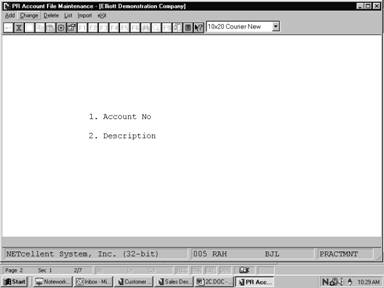
PR Account File Maintenance Entry Screen
The following options are available:
* Select the
desired mode from the PR Account File menu bar
* Enter the
data requested on the screen
To return to the menu bar, press
the ESC or F10 key. To leave this application, press X for
EXIT when positioned at the menu bar.
Entry Field Descriptions
|
Name
|
Type
and Description
|
|
1. Account No
|
An account number in the
standard account number format.
Enter the account number from G/L.
In the change or delete
modes, pressing the F7 key will allow you to search for the account by
number or pressing the F8 key will allow you to search for the account
by description.
|
|
2. Description
|
30 alphanumeric characters.
Enter a description of the
account number, which will make it clear to the operator at a glance whether
or not he has entered the correct number.
|
List
|
Name
|
Type
and Description
|
|
Starting Account No
|
An account number in the
standard account number format.
Enter the beginning of the range of accounts, which you
wish to have listed.
This field defaults to All.
Pressing the F7 key
will allow you to search for the account by number or pressing the F8
key will allow you to search for the account by description.
|
|
Ending Account No
|
An account number in the
standard account number format.
Enter the end of the range of accounts, which you wish
to have listed.
This field defaults to the
starting account number to facilitate listing a single account number.
|
Import PR Accounts from G/L
|
Name
|
Type
and Description
|
|
1. Starting Account No
|
An account number in the
standard account number format.
This question and the next one (ending account number)
allow you to specify a range of account to be imported from the G/L
Account File.
If you press RETURN
for the entry of the starting account number, the field will default to All
accounts, and the entry of the ending account number will be skipped.
|
|
2. Ending Account No
|
An account number in the
standard account number format.
If you press RETURN
for the entry of the ending account number, the field will default to the
same value as entered for the starting account number.
|
|
Date
filled out ____________by___________ ADD CHANGE DELETE
PR VALID G/L ACCOUNT FILE MAINTENANCE LOAD SHEET
1.
Account # _ _ _ _ _ _ _ _ ‑ _ _ _ _ _ _ _ _ - _ _ _ _ _ _ _ _
2.
Description
_ _ _ _ _ _ _ _ _ _ _ _ _ _ _ _ _ _ _ _ _ _ _ _ _ _ _ _ _ _
1.
Account # _ _ _ _ _ _ _ _ ‑ _ _ _ _ _ _ _ _ - _ _ _ _ _ _ _ _
2.
Description
_ _ _ _ _ _ _ _ _ _ _ _ _ _ _ _ _ _ _ _ _ _ _ _ _ _ _ _ _ _
1.
Account # _ _ _ _ _ _ _ _ ‑ _ _ _ _ _ _ _ _ - _ _ _ _ _ _ _ _
2.
Description
_ _ _ _ _ _ _ _ _ _ _ _ _ _ _ _ _ _ _ _ _ _ _ _ _ _ _ _ _ _
1.
Account # _ _ _ _ _ _ _ _ ‑ _ _ _ _ _ _ _ _ - _ _ _ _ _ _ _ _
2.
Description
_ _ _ _ _ _ _ _ _ _ _ _ _ _ _ _ _ _ _ _ _ _ _ _ _ _ _ _ _ _
1.
Account # _ _ _ _ _ _ _ _ ‑ _ _ _ _ _ _ _ _ - _ _ _ _ _ _ _ _
2.
Description
_ _ _ _ _ _ _ _ _ _ _ _ _ _ _ _ _ _ _ _ _ _ _ _ _ _ _ _ _ _
1.
Account # _ _ _ _ _ _ _ _ ‑ _ _ _ _ _ _ _ _ - _ _ _ _ _ _ _ _
2.
Description
_ _ _ _ _ _ _ _ _ _ _ _ _ _ _ _ _ _ _ _ _ _ _ _ _ _ _ _ _ _
1.
Account # _ _ _ _ _ _ _ _ ‑ _ _ _ _ _ _ _ _ - _ _ _ _ _ _ _ _
2.
Description
_ _ _ _ _ _ _ _ _ _ _ _ _ _ _ _ _ _ _ _ _ _ _ _ _ _ _ _ _ _
1.
Account # _ _ _ _ _ _ _ _ ‑ _ _ _ _ _ _ _ _ - _ _ _ _ _ _ _ _
2.
Description
_ _ _ _ _ _ _ _ _ _ _ _ _ _ _ _ _ _ _ _ _ _ _ _ _ _ _ _ _ _
1.
Account # _ _ _ _ _ _ _ _ ‑ _ _ _ _ _ _ _ _ - _ _ _ _ _ _ _ _
2.
Description
_ _ _ _ _ _ _ _ _ _ _ _ _ _ _ _ _ _ _ _ _ _ _ _ _ _ _ _ _ _
1.
Account # _ _ _ _ _ _ _ _ ‑ _ _ _ _ _ _ _ _ - _ _ _ _ _ _ _ _
2.
Description
_ _ _ _ _ _ _ _ _ _ _ _ _ _ _ _ _ _ _ _ _ _ _ _ _ _ _ _ _ _
Date
Entered___________by__________Date Verified__________by_________
|
Load Sheet
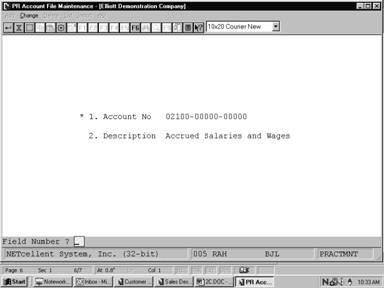 Screens
PR Account File Maintenance
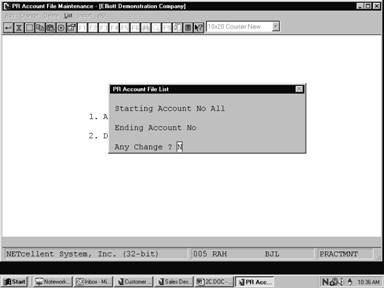
PR Account File List
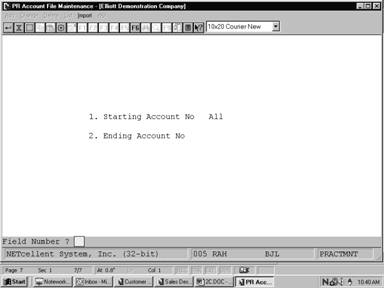
PR Account File Maintenance
Import Screen
P A Y R O L L A C C O U N T F I L E L I S
T
Range:
All Accounts
Account‑No
Description
01010‑00000‑00000
Cash in Bank ‑ Account #1
01010‑10000‑00000
Cash in Bank ‑ Account #1
02060‑00000‑00000
Accrued Expenses
02060‑10000‑00000
Accrued Expenses
02100‑00000‑00000
Accrued Salaries and Wages
02100‑10000‑00000
Accrued Salaries and Wages
02120‑00000‑00000
Accrued Vacation and Sick Pay
02120‑10000‑00000
Accrued Vacation and Sick Pay
02130‑00000‑00000
Federal Withholding Taxes
02130‑10000‑00000
Federal Withholding Taxes
02135‑00000‑00000
Earned Income Credit
02135‑10000‑00000
Earned Income Credit
02140‑00000‑00000
Employee FICA Liability
02140‑10000‑00000
Employee FICA Liability
02145‑00000‑00000
Employer FICA Liability
02145‑10000‑00000
Employer FICA Liability
02150‑00000‑00000
Accrued Liabilities
02150‑10000‑00000
Accrued Liabilities
02160‑00000‑00000
City Withholding Liability
02160‑10000‑00000
City Withholding Liability
02170‑00000‑00000
State Withholding Liability

